Image Recognition Example Using CreateML #IOSDev


Hello everyone, in this tutorial I would like to share about using CreateML Framework to recognition image. in the end of this tutorial we will achieve model from training data that can be use to be mlmodel in xcode. 

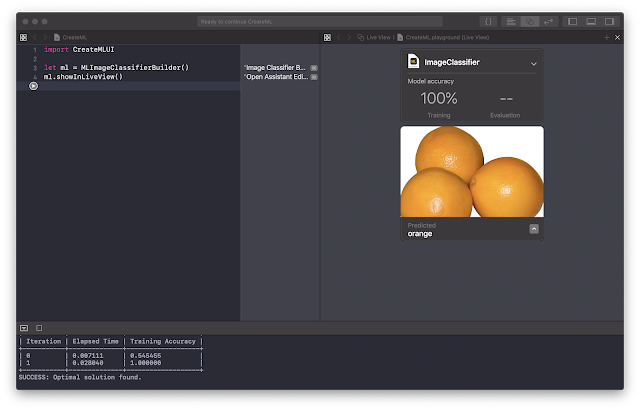
like example bellow


above picture means picture orange that we put on that view has recognise that it is an orange. so cool is'nt it?

lets go ahead.  

first, create and playground project and then choose macOS platform, like bellow.

note : we need to choose macOS project because, the framework that we use is only available on macOS platform. 

after that, put the code bellow in playground editor.  and then run it

when you run the code, MLUI will appear beside your editor, we use the MLUI to put our data training. so in the next step, you need to prepare the training data. in this tutorial I have collecting training data about some fruits, apple and orange. you could download it here

drag the training folder to MLUI until the image processing has done.


after process done, now you could test by drag testing data like bellow. 


Hurray, our image has recognise as orange.  you can try with another training data.. good luck ^_^


Popular posts from this blog

OpenVPN Alternatif Solusi Menanggulangi Blokir dari KOMINFO

Sejak akhir juli 2022 kemaren indonesia di gegerkan dengan tindakan kominfo atas diblokirnya banyak platform digital karna tidak mendaftar PSE, terutama paypal dan plaform game (steam, epic game dll). keputusan ini semakin membuat netizen geram dikarenakan platform judi online malah disetujui untuk beroperasi karna sudah daftar PSE. Jujur menurut saya memang keputusan ini sejak awal saya dengar sudah mengada-ada karna sangat aneh memblokir semua platform digital yang jumlahnya tidak terhitung banyaknya dan hanya membolehkan akses platform yang sudah mendaftar yang jumlahnya hanya ratusan.  saya sebagai developer juga merasa aneh banget ini kebijakan apalagi platform development juga banyak yang di blacklist oleh kominfo seperti, github, gitlab, bitbucket, even website CDN pun di blacklist. astaga wkwkwk. anyway terlepas dari kebijakan konyol ini, saya mau berbagi tips cara agar tetep bisa mengakses semua platform tersebut tanpa ada halangan, yaitu dengan menggunakan VPN. banyak ban...

Switching Validator Language in Echo Framework #GolangDev

pixabay.com Hello everyone, for right now I wanna share how to switch language validator in the echo framework. this framework actually using the go-playground library as its default validator. so if you wanna use a validator and have a limited example to read, just go to this repository, you can find more examples about its usability. don't forget to hit the stars, it's very useful.  In my case, I have an issue that my current project needs me to translate the validator error message from English into Bahasa Indonesia. there is an example in the go-playground validator repository that we can switch the validator message into another language. Thank god, there is an Indonesian developer who contributes that repository to translate the message into Bahasa Indonesia.  after implementing code from go-playground documentation, then I got next issue, the thing is we need to implement the current docs into the echo framework version, which is not suitable at all, you will find an ...

Membuat Game Sederhana Dengan JavaScript

Assalamualaikum Wr Wb Javascript adalah Bahasa pemrograman yang di pakai di web, javascript kebanyakan di gunakan untuk kebutuhan membuat animasi, tapi tidak semata-mata javascript hanya bisa di pakai untuk membuat animasi, untuk kebutuhan operasi web pun sering di gunakan. Javascript bersifat Client Side, maksudnya adalah javascript berjalan di PC pengguna atau pengakses web, dan scriptnya pun bisa di lihat oleh user, berbeda dengan PHP yang scriptnya tidak bisa di lihat oleh user. Selain di buat animasi, Javascript juga bisa di pakai untuk membuat aplikasi web, salah satunya adalah GAME, pada kesempatan kali ini saya akan memberikan tutorial bagaimana membuat GAME sederhana dengan Javascript, memanfaatkan event-event dalam javascript. berikut screenshoot dari game sederhana : Alur Game : 1. Klik button Start. 2. gambar monster akan bergerak cepat. 3. klik sebanyak mungkin gambar monsternya. 4. Apabila skor lebih dari 20, maka anda akan menang. untuk s...